Notice: Any messages purporting to come from this site telling you that your password has expired, or that you need to verify your details, confirm your email, resolve issues, making threats, or asking for money, are
spam. We do not email users with any such messages. If you have lost your password you can obtain a new one by using the
password reset link.
Due to spam on this forum, all posts now need moderator approval.
Entire forum
➜ MUSHclient
➜ General
➜ I am a newbie for mushclient! ask a quest? plz help!
|
I am a newbie for mushclient! ask a quest? plz help!
|
It is now over 60 days since the last post. This thread is closed.
Refresh page
| Posted by
| Talent
(2 posts) Bio
|
| Date
| Tue 13 May 2003 03:50 PM (UTC) |
| Message
| I dont know how to use scripting functions at Command line,
why i can not do it??? | | Top |
|
| Posted by
| Nick Gammon
Australia (23,173 posts) Bio
Forum Administrator |
| Date
| Reply #1 on Tue 13 May 2003 08:58 PM (UTC) Amended on Tue 13 May 2003 09:01 PM (UTC) by Nick Gammon
|
| Message
| This wasn't really a tip for other people, so I moved your question to the 'general' section.
You need to enable scripting, see:
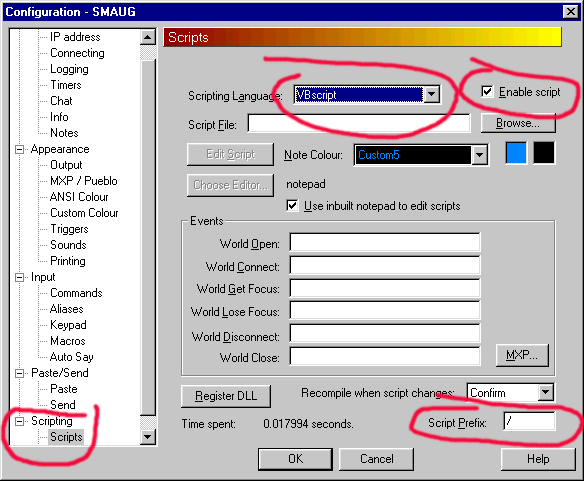
Then you can type the 'script prefix' followed by a script command, eg.
/ world.note "hello"
|
- Nick Gammon
www.gammon.com.au, www.mushclient.com | | Top |
|
| Posted by
| Talent
(2 posts) Bio
|
| Date
| Reply #2 on Wed 14 May 2003 01:06 AM (UTC) |
| Message
| |
The dates and times for posts above are shown in Universal Co-ordinated Time (UTC).
To show them in your local time you can join the forum, and then set the 'time correction' field in your profile to the number of hours difference between your location and UTC time.
12,854 views.
It is now over 60 days since the last post. This thread is closed.
Refresh page
![[Go to top]](/images/gototop.gif) top
top