How to make changes, including compiling
by Nick Gammon
This page is in response to the many emails and forum messages I get such as:
- How do I make changes to my MUD?
- How do I do a compile?
- What is source?
- Where do I get the source?
- Where do I get a compiler?
- What is "make"?
- What is an object file?
- What is "linking"?
- How do I edit things?
- How do I find where to change something?
- How about an example?
How do I make changes to my MUD?
MUDs are generally designed to be configurable, so many changes can be made without changes to the code. Such changes are:
- Editing area files
- Changing system parameters
- Editing command/socials/skills files
- Changing other files like race and class files
Editing area files
- You can edit the area files either online using OLC (OnLine Coding), which is built-into SMAUG, and available as an option for ROM. This effectively lets anyone connected to the MUD (with a high enough level) to change areas "on the fly".
- You can use our offline "area editor". This is at: http://www.gammon.com.au/smaugeditor/smaugeditor.htm
Here is an example of using the area editor:
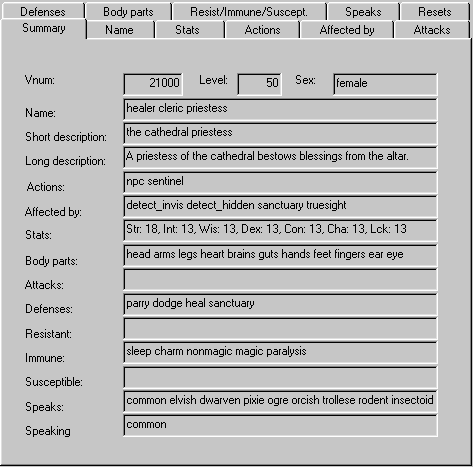
- You can use any text editor to edit the area files. They can be a bit obscure, but this is a last resort if you don't want to use the other methods.
#21000
healer cleric priestess~
the cathedral priestess~
A priestess of the cathedral bestows blessings from the altar.
~
~
3 4194472 1000 C
50 0 0 25d500+300 0d0+0
0 0
8 8 2
18 13 13 13 13 13 13
0 0 0 0 0
0 1 0 0 262143 1 0
0 0 2047 0 3156992 0 0 263
In the area files you can change:
- Rooms, room descriptions, room flags
- Exits leading from one room to another
- Mobiles (mobs) - the automated creatures that populate the MUD
- Objects - things you can look at or carry
- Resets - commands that load objects and mobiles into rooms at defined intervals
Changing system parameters
In the "system" sub-folder is a file "sysdata.dat". By editing this (with Notepad, for example) you can change some system parameters. Note that "strings" like the MUD name, must end with the tilde character (~) or the file will not load in properly.
|
Editing other files
You can also edit:
- commands.dat - commands players can type
- skills.dat - skills they can use including spells
- socials.dat - socials they can use, eg. "smile"
- herbs.dat - herbs they can use
- tongues.dat - tongues they can speak in
There are other directories too with files in them, clans, classes, races and so on. Edit the files in them (with Notepad) to get an idea of what they do.
Changing the welcome screen
This is an easy one to do. Edit the file area\help.are and modify the help topic "GREETING".
How do I do a compile?
Eventually you will want to make a change that is not allowed for in the configuration files, such as:
- Adding more levels
- Changing some messages such as "Thoric says, 'Prepare for the worst!'"
- Changing the questions asked of new players
- Changing colours used in things like the WHO list
- Adding MXP (Mud Extension Protocol)
- Making things work differently
To do this, you need to obtain and modify "the source".
What is source?
Source (code) is computer instructions written in a human-readable language. In this case most MUDs are written in the C (or C++) language so you expect to change C source code.
Before source code can be used by the computer it must be "compiled" and "linked".
What is compiling?
Compiling turns source code into machine code. The program that does this is called a compiler. In the case of MUDs there will be more than one source file, so it is necessary to compile many files.
Generally the source files names with end with ".c" and the object file (the compiled file) will end in ".o" or ".obj".
In the case of SMAUG, if you do a directory listing of the ".c" files you would see something like this:
|
After compiling the source files you would see a similar number of ".o" files:
|
In this case there are fewer .o files than .c files because of some options that were disabled during the compilation process.
Where do I get the source?
The source for SMAUG and ROM (modified to work under Microsoft Visual C++) are available at this site - see the "Downloads" button above.
The original source designed to compile under Unix is available from the original site. A lot of it can be found at http://www.game.org
Where do I get a compiler?
Windows
The main compilers I would recommend for compiling a MUD on Windows are:
- Microsoft Visual C++ - this is a powerful compiler with built-in editor, linker and debugger. It is quite easy and fast to use. However as a commercial product you may pay between $US 100 and $US 500 for it, depending on where you live and whether you are a student or not.
- Cygwin - this is a "free" (ie. no cost) compiler made by the people who brought you the GNU development tools. It is slightly harder to use than Microsoft's compiler, but once you are used to it, rebuilding the software can be as simple as making a change to the source and typing "make". The download can be quite large (several megabytes) but once you have it, you should not need to change it for a while. You can get Cygwin at http://www.cygwin.com/.
For a step-by-step guide for getting Cygwin, see Installing Cygwin.
If you use Cygwin it will help to understand some rudimentary Unix commands, or you will have trouble using the "shell" (command interpreter). This should get you started:
Windows Unix copy cp del rm move mv dir ls cd cd Also, Unix uses the forward slash in file names rather than the backslash.
Unix
Of course if you are using Linux, OpenBSD, FreeBSD or some similar Unix operating system, then all the tools you need should be installed "out of the box". If not, you may need to install the compiling tools from the distribution CDROM.
What is "make"?
The program "make" is used by Unix/Cygwin to automate compiling and linking the files that comprise the executable. Make reads a configuration file (usually called "makefile" or "Makefile") which has rules for which files need to be compiled, and which depend on other files.
Usually you can use make by changing directories to the directory with the source in it (ie. the .c files) and then just typing:
makeMake is smart enough to not recompile source that has already been compiled, and not changed since that compile.
If you are using the Microsoft compiler then you don't need to use make, just invoke a "rebuild" (usually F7).
What is an object file?
As each file is compiled the compiler generates an "object" file, which is the C code turned into computer code. Depending on the compiler:
- Microsoft Visual C++: build.c produces build.obj
- Unix/Cygwin: build.c produces build.o
Sometimes you might want to delete the object files to force a recompile, for example, if you changed an option in one of the include files.
In the case of Unix/Cygwin, you would type:
rm *.oOften the make file will be set up so that typing "make clean" will have the same effect.
In the case of Microsoft Visual C++ you simply do a "rebuild all".
What is "linking"?
Once all the files are compiled they must be "merged together" to produce a single executable file (the program that you eventually run). This process is called linking. In the case of Unix the compiler will often do the linking as a final step (when told to by the make file). In the case of Microsoft Visual C++ the linking happens once all files are compiled OK.
How do I edit things?
Virtually any editor can edit the source files (and area files etc.). For instance, Notepad that comes with Windows will do the trick. However there are easier editors to use, ones that have "find in files", syntax colouring, automatic indenting and so on. I use UltraEdit (http://www.ultraedit.com) however the are dozens of programmer editors around that you could choose from.
How do I find where to change something?
First, search for a word that you want to change, like "Thoric", just use a program that will do a search in multiple files (eg. Microsoft Visual C++, UltraEdit, grep). If you are using Unix/Cygwin, grep does a good job. For example:
Using grep
|
In the example above I searched for Thoric with a double-quote in front, to eliminate a lot of false matches (because Thoric was the author of the code). You can see the you will find references to him in:
- act_obj.c - line 2230
- fight.c - line 265
- magic.c - line 2580
- update.c - line 661
Now it is a simple matter of editing those four files, and going to those lines. The "-n" option in grep said to display the line numbers. You could also use "-i" to do a case-insensitive search if you thought the word "thoric" might be there.
Another way of finding things is to know that the authors of the MUD servers generally name their functions in a consistent way. For example when you type "who" that is handled by function "do_who". If you type "score" that is handled by a function "do_score".
Here is an example of finding the do_who function:
|
In this example I added the extra option "w" to tell it to match on exact words. This eliminates matches on "do_whois" for example.
As you can see, there was more than one match, however the first two are comments, and most of the others are references to do_who, not the function itself. You can usually pick the function because it will be preceded by a data type, or the word "void". Thus, the function do_who is coded at line 2376 of file act_info.c.
Since all commands will be implemented in the same general way (ie. return void) you can make it easier for yourself by searching for the word void too, eg.
|
However if you wanted to be cautious (because there might be two spaces between "void" and "do_who" you could tell grep to match on one or more "space-type" characters, as in the example below. Because of the extra typing I would probably try the simpler one above, and if that failed to produce a match, use the more complex one below.
|
Both of those examples return the exact file and line number, without any extraneous material to sift through.
Using ctags
Another really useful utility is "ctags" that seems to come as part of Cygwin, and can be installed if not already there for Unix. What this does is - on request - search all your source and build a "tags" file. You can then use that tag file to go directly to a particular function.
To use ctags, first index your source - you only need to do this once initially, and occasionally after that if you make major changes. If you add new functions, but do not rescan then the new functions won't be in the tag file.
|
On my 166 MHz Pentium, the above step took 7 seconds (under Cygwin).
Then to go to a particular tag, you can invoke vim with the -t option, like this:
|
Also, once you are editing with vim, you can go to any other tagged function by putting the cursor on a reference to it, and pressing Ctrl+]. Afterwards, pressing Ctrl+T takes you back to where you were before following the tag. This is very helpful for seeing what a routine does, when you see it being called.
How about an example?
Below I will work through installing the SMAUG source (the one with MXP built in), compiling and running it. Then we will change a couple of things and recompile.
I will assume that you have installed Cygwin from http://www.cygwin.com/.
If not, see Installing Cygwin.
Things you type will be in bold.
- Download the source from http://www.gammon.com.au/files/smaug/smaug1.4a_mxp.tgz (1.50 Mb) and save it to your personal directory in Cygwin, eg. c:\Cygwin\home\nick\
- Start up the Cygwin bash shell ("bash" is the name of the command interpreter).
- Type "ls" to confirm the file is there:
$ ls smaug1.4a_mxp.tgz - Unzip the file using "tar" and confirm the new directory is there by typing "ls":
$ tar xzf smaug1.4a_mxp.tgz $ ls smaug smaug1.4a_mxp.tgzIf you want to see the names of each file as they are unzipped use "tar xvzf" rather than "tar xzf". The extra "v" tells tar to be "verbose", and it will list the names of each file and directory as they are processed.
- Change to the directory smaug/dist:
$ cd smaug $ ls dist ftp_game.org $ cd dist $ ls area boards clans corpses deity doc log player src backup building classes councils deleted gods new races system - Change to the src directory:
$ cd src $ ls Makefile db.c ident.c imm_host.c router.c Makefile.Cygwin deity.c imc-comm.h interp.c save.c act_comm.c fight.c imc-config.c magic.c services.c act_info.c grub.c imc-config.h makeobjs.c shops.c act_move.c handler.c imc-events.c mapout.c skills.c act_obj.c hashstr.c imc-interp.c misc.c special.c act_wiz.c ibuild.c imc-mail.c mpxset.c startup ban.c ice.c imc-mail.h mud.h stat_obj.c bet.h ice.h imc-mercbase.c mud_comm.c tables.c boards.c icec-merc.h imc-mercbase.h mud_prog.c track.c build.c icec-mercbase.c imc-mercdefs.h planes.c update.c clans.c icec-mercbase.h imc-smaug.h planes.h webclient.c colorize.c icec.c imc-util.c player.c webserver.c comm.c icec.h imc-version.c polymorph.c comments.c iced.c imc.c requests.c const.c iced.h imc.h reset.c - If you are using Unix (Linux or whatever) skip this step. Otherwise, if you are using Cygwin, rename the original Makefile as Makefile.Unix and then rename Makefile.Cygwin as Makefile:
$ mv Makefile Makefile.Unix $ mv Makefile.Cygwin MakefileThis step changes slightly some of the parameters in the Makefile to eliminate compile or link errors.
If you want to see what the changes are you can type "diff Makefile Makefile.Unix".
- Compile and link SMAUG by typing "make":
$ make make smaug make[1]: Entering directory `/home/nick/smaug/dist/src' gcc -c -O -g3 -Wall -Wuninitialized -DSMAUG act_comm.c gcc -c -O -g3 -Wall -Wuninitialized -DSMAUG act_info.c gcc -c -O -g3 -Wall -Wuninitialized -DSMAUG act_move.c gcc -c -O -g3 -Wall -Wuninitialized -DSMAUG act_obj.c act_obj.c: In function `can_layer': act_obj.c:1389: warning: suggest explicit braces to avoid ambiguous `else' act_obj.c: In function `do_auction': act_obj.c:2651: warning: suggest explicit braces to avoid ambiguous `else' act_obj.c:2675: warning: suggest explicit braces to avoid ambiguous `else' gcc -c -O -g3 -Wall -Wuninitialized -DSMAUG act_wiz.c gcc -c -O -g3 -Wall -Wuninitialized -DSMAUG boards.c gcc -c -O -g3 -Wall -Wuninitialized -DSMAUG build.c build.c: In function `fold_area': build.c:6058: warning: suggest explicit braces to avoid ambiguous `else' build.c:6061: warning: suggest explicit braces to avoid ambiguous `else' build.c:6064: warning: suggest explicit braces to avoid ambiguous `else' build.c:6070: warning: suggest explicit braces to avoid ambiguous `else' build.c:6075: warning: suggest explicit braces to avoid ambiguous `else' build.c:6078: warning: suggest explicit braces to avoid ambiguous `else' gcc -c -O -g3 -Wall -Wuninitialized -DSMAUG clans.c gcc -c -O -g3 -Wall -Wuninitialized -DSMAUG comm.c gcc -c -O -g3 -Wall -Wuninitialized -DSMAUG comments.c gcc -c -O -g3 -Wall -Wuninitialized -DSMAUG const.c gcc -c -O -g3 -Wall -Wuninitialized -DSMAUG db.c db.c: In function `load_resets': db.c:1594: warning: suggest explicit braces to avoid ambiguous `else' gcc -c -O -g3 -Wall -Wuninitialized -DSMAUG deity.c gcc -c -O -g3 -Wall -Wuninitialized -DSMAUG fight.c gcc -c -O -g3 -Wall -Wuninitialized -DSMAUG handler.c handler.c: In function `get_eq_char': handler.c:1335: warning: suggest explicit braces to avoid ambiguous `else' gcc -c -O -g3 -Wall -Wuninitialized -DSMAUG hashstr.c gcc -c -O -g3 -Wall -Wuninitialized -DSMAUG ibuild.c gcc -c -O -g3 -Wall -Wuninitialized -DSMAUG ident.c gcc -c -O -g3 -Wall -Wuninitialized -DSMAUG interp.c interp.c: In function `interpret': interp.c:758: warning: int format, long int arg (arg 7) interp.c:758: warning: int format, long int arg (arg 8) gcc -c -O -g3 -Wall -Wuninitialized -DSMAUG magic.c magic.c: In function `process_spell_components': magic.c:985: warning: suggest explicit braces to avoid ambiguous `else' magic.c:1003: warning: suggest explicit braces to avoid ambiguous `else' gcc -c -O -g3 -Wall -Wuninitialized -DSMAUG makeobjs.c gcc -c -O -g3 -Wall -Wuninitialized -DSMAUG mapout.c gcc -c -O -g3 -Wall -Wuninitialized -DSMAUG misc.c gcc -c -O -g3 -Wall -Wuninitialized -DSMAUG mpxset.c gcc -c -O -g3 -Wall -Wuninitialized -DSMAUG mud_comm.c gcc -c -O -g3 -Wall -Wuninitialized -DSMAUG mud_prog.c gcc -c -O -g3 -Wall -Wuninitialized -DSMAUG player.c gcc -c -O -g3 -Wall -Wuninitialized -DSMAUG polymorph.c gcc -c -O -g3 -Wall -Wuninitialized -DSMAUG requests.c gcc -c -O -g3 -Wall -Wuninitialized -DSMAUG reset.c gcc -c -O -g3 -Wall -Wuninitialized -DSMAUG save.c save.c: In function `load_char_obj': save.c:949: warning: suggest explicit braces to avoid ambiguous `else' gcc -c -O -g3 -Wall -Wuninitialized -DSMAUG shops.c shops.c: In function `appraise_all': shops.c:1095: warning: suggest explicit braces to avoid ambiguous `else' gcc -c -O -g3 -Wall -Wuninitialized -DSMAUG skills.c gcc -c -O -g3 -Wall -Wuninitialized -DSMAUG special.c gcc -c -O -g3 -Wall -Wuninitialized -DSMAUG tables.c gcc -c -O -g3 -Wall -Wuninitialized -DSMAUG track.c gcc -c -O -g3 -Wall -Wuninitialized -DSMAUG update.c gcc -c -O -g3 -Wall -Wuninitialized -DSMAUG grub.c gcc -c -O -g3 -Wall -Wuninitialized -DSMAUG stat_obj.c gcc -c -O -g3 -Wall -Wuninitialized -DSMAUG ban.c gcc -c -O -g3 -Wall -Wuninitialized -DSMAUG services.c gcc -c -O -g3 -Wall -Wuninitialized -DSMAUG planes.c gcc -c -O -g3 -Wall -Wuninitialized -DSMAUG imm_host.c gcc -c -O -g3 -Wall -Wuninitialized -DSMAUG colorize.c rm -f smaug gcc -lcrypt -lregex -o smaug act_comm.o act_info.o act_move.o act_obj.o act wiz.o boards.o build.o clans.o comm.o comments.o const.o db.o deity.o fight.o h ndler.o hashstr.o ibuild.o ident.o interp.o magic.o makeobjs.o mapout.o misc.o pxset.o mud_comm.o mud_prog.o player.o polymorph.o requests.o reset.o save.o sh ps.o skills.o special.o tables.o track.o update.o grub.o stat_obj.o ban.o servi es.o planes.o imm_host.o colorize.o chmod g+w smaug.exe chmod a+x smaug.exe chmod g+w act_comm.o act_info.o act_move.o act_obj.o act_wiz.o boards.o build.o clans.o comm.o comments.o const.o db.o deity.o fight.o handler.o hashstr.o ibui d.o ident.o interp.o magic.o makeobjs.o mapout.o misc.o mpxset.o mud_comm.o mud prog.o player.o polymorph.o requests.o reset.o save.o shops.o skills.o special. tables.o track.o update.o grub.o stat_obj.o ban.o services.o planes.o imm_host o colorize.o make[1]: Leaving directory `/home/nick/smaug/dist/src'You will notice some warnings about "suggest explicit braces" and other things. You can ignore those. If you are keen edit the appropriate source files and eliminate the warnings.
If you get an error message along the lines of:
/usr/lib/gcc-lib/i686-pc-cygwin/3.2/../../../../i686-pc-cygwin/bin/ld: cannot find -lregex collect2: ld returned 1 exit status make[1]: *** [smaug] Error 1 make[1]: Leaving directory `/home/nick/smaug/dist/src' make: *** [all] Error 2... you may need to edit the file "Makefile" and comment-out the line regarding regexp, like this:
#Uncomment the line below if you are getting undefined re_exec errors #NEED_REG = -lregex - Now we can test the MUD out. Change to the "area" directory, and then run the program smaug.exe (which is still in the src directory):
$ cd ../area $ ../src/smaug.exe Tue Jul 17 15:31:36 2001 :: Booting Database 0 0 0 0 0 0 0 0 0 0 0 0 0 0 0 0 0 0 0 0 0 0 0 0 0 0 0 0 0 0 0 0 Tue Jul 17 15:31:36 2001 :: [*****] BOOT: ---------------------[ Boot Log ]----- --------------- Tue Jul 17 15:31:36 2001 :: Loading commands Tue Jul 17 15:31:36 2001 :: Loading sysdata configuration... Tue Jul 17 15:31:36 2001 :: Loading socials Tue Jul 17 15:31:36 2001 :: Loading skill table Tue Jul 17 15:31:36 2001 :: Sorting skill table... Tue Jul 17 15:31:36 2001 :: Remapping slots to sns Tue Jul 17 15:31:36 2001 :: Loading classes Tue Jul 17 15:31:36 2001 :: Loading races Tue Jul 17 15:31:36 2001 :: Loading herb table Tue Jul 17 15:31:36 2001 :: Loading tongues Tue Jul 17 15:31:36 2001 :: Making wizlist Tue Jul 17 15:31:36 2001 :: Initializing request pipe Tue Jul 17 15:31:36 2001 :: Initializing random number generator Tue Jul 17 15:31:36 2001 :: Setting time and weather Tue Jul 17 15:31:36 2001 :: Assigning gsn's Tue Jul 17 15:31:36 2001 :: Reading in area files... (help.are) (imc-help.are) (ice-help.are) gods.are : Rooms: 1200 - 1201 Objs: 1200 - 1200 Mobs: 1200 - 1200 limbo.are : Rooms: 1 - 43 Objs: 2 - 99 Mobs: 1 - 99 newacad.are : Rooms: 10300 - 10499 Objs: 10300 - 10499 Mobs: 10300 - 10499 newgate.are : Rooms: 100 - 199 Objs: 100 - 199 Mobs: 100 - 199 newdark.are : Rooms: 21000 - 21499 Objs: 21000 - 21435 Mobs: 21000 - 21499 haon.are : Rooms: 6000 - 6156 Objs: 6000 - 6155 Mobs: 6000 - 6117 midennir.are : Rooms: 3500 - 3590 Objs: 3500 - 3550 Mobs: 3500 - 3550 sewer.are : Rooms: 7001 - 7445 Objs: 7190 - 7310 Mobs: 7000 - 7206 redferne.are : Rooms: 7900 - 7918 Objs: 7909 - 7911 Mobs: 7900 - 7900 grove.are : Rooms: 8901 - 8999 Objs: 8900 - 8919 Mobs: 8900 - 8911 dwarven.are : Rooms: 6500 - 6554 Objs: 6502 - 6519 Mobs: 6500 - 6517 daycare.are : Rooms: 6601 - 6651 Objs: 6600 - 6647 Mobs: 6600 - 6610 grave.are : Rooms: 3600 - 3651 Objs: 3600 - 3613 Mobs: 3600 - 3605 chapel.are : Rooms: 3405 - 3475 Objs: 3400 - 3430 Mobs: 3400 - 3416 astral.are : Rooms: 800 - 899 Objs: 800 - 899 Mobs: 800 - 899 Build.are : Rooms: 9500 - 9589 Objs: 0 - 0 Mobs: 0 - 0 pixie.are : Rooms: 2070 - 2099 Objs: 2070 - 2076 Mobs: 2070 - 2073 export.are : Rooms: 9810 - 9899 Objs: 9810 - 9899 Mobs: 9800 - 9899 srefuge.are : Rooms: 1500 - 1599 Objs: 1500 - 1599 Mobs: 1500 - 1599 manor.are : Rooms: 2400 - 2499 Objs: 2400 - 2499 Mobs: 2405 - 2484 unholy.are : Rooms: 2101 - 2172 Objs: 2101 - 2150 Mobs: 2101 - 2120 gallery.are : Rooms: 24800 - 24899 Objs: 24800 - 24899 Mobs: 24800 - 24899 Tue Jul 17 15:31:36 2001 :: Fixing exits Tue Jul 17 15:31:36 2001 :: Initializing economy Tue Jul 17 15:31:36 2001 :: Resetting areas Resetting: gods.are Resetting: limbo.are Resetting: newacad.are Resetting: newgate.are Resetting: newdark.are Resetting: haon.are Resetting: midennir.are Resetting: sewer.are Resetting: redferne.are Resetting: grove.are Resetting: dwarven.are Resetting: daycare.are Resetting: grave.are Resetting: chapel.are Resetting: astral.are Resetting: Build.are Resetting: pixie.are Resetting: export.are Resetting: srefuge.are Resetting: manor.are Resetting: unholy.are Resetting: gallery.are Tue Jul 17 15:31:36 2001 :: Loading buildlist Tue Jul 17 15:31:36 2001 :: Loading boards Tue Jul 17 15:31:36 2001 :: ../boards/immortal.brd Tue Jul 17 15:31:36 2001 :: ../boards/highgod.brd Tue Jul 17 15:31:36 2001 :: Loading clans Tue Jul 17 15:31:36 2001 :: Loading clans... Tue Jul 17 15:31:36 2001 :: vampire.gui Tue Jul 17 15:31:36 2001 :: Cannot open clan vault Tue Jul 17 15:31:36 2001 :: druid.gui Tue Jul 17 15:31:36 2001 :: Cannot open clan vault Tue Jul 17 15:31:36 2001 :: warrior.gui Tue Jul 17 15:31:36 2001 :: Cannot open clan vault Tue Jul 17 15:31:36 2001 :: augurer.gui Tue Jul 17 15:31:36 2001 :: Cannot open clan vault Tue Jul 17 15:31:36 2001 :: thief.gui Tue Jul 17 15:31:36 2001 :: Cannot open clan vault Tue Jul 17 15:31:36 2001 :: cleric.gui Tue Jul 17 15:31:36 2001 :: Cannot open clan vault Tue Jul 17 15:31:36 2001 :: mage.gui Tue Jul 17 15:31:36 2001 :: Cannot open clan vault Tue Jul 17 15:31:36 2001 :: ranger.gui Tue Jul 17 15:31:36 2001 :: Cannot open clan vault Tue Jul 17 15:31:36 2001 :: $ Tue Jul 17 15:31:36 2001 :: Done clans Tue Jul 17 15:31:36 2001 :: Loading councils Tue Jul 17 15:31:36 2001 :: Loading deities... Tue Jul 17 15:31:36 2001 :: test.dty Tue Jul 17 15:31:36 2001 :: $ Tue Jul 17 15:31:36 2001 :: Done deities Tue Jul 17 15:31:36 2001 :: Loading deities Tue Jul 17 15:31:36 2001 :: Loading councils... Tue Jul 17 15:31:36 2001 :: $ Tue Jul 17 15:31:36 2001 :: Done councils Tue Jul 17 15:31:36 2001 :: Loading watches Tue Jul 17 15:31:36 2001 :: Loading bans Tue Jul 17 15:31:36 2001 :: Done. Tue Jul 17 15:31:36 2001 :: Loading reserved names Tue Jul 17 15:31:36 2001 :: Loading corpses Tue Jul 17 15:31:36 2001 :: Loading Immortal Hosts Tue Jul 17 15:31:36 2001 :: Done. Tue Jul 17 15:31:36 2001 :: Loading Projects Tue Jul 17 15:31:36 2001 :: Loading Morphs Tue Jul 17 15:31:36 2001 :: Optimizing Morphs. Tue Jul 17 15:31:36 2001 :: Done. Tue Jul 17 15:31:36 2001 :: Loading Colors Tue Jul 17 15:31:36 2001 :: Initializing socket Tue Jul 17 15:31:36 2001 :: (Name Not Set) ready at address bogart on port 4000. - You can now connect to the server using your client program (eg. MUSHclient) by connecting to:
- IP address: 127.0.0.1
- Port: 4000
- Connect as character Lordrom, password "win95". You will be in the "Darkhaven Academy Supply Store" which is where I was when I saved the Lordrom character in this archive.
- The name of the MUD is in the file system/sysdata.dat. You can edit that file and change "(Name Not Set)" to the name of your MUD.
Making changes
OK, let's change the code now that we know it works.
- Shutdown the MUD by typing in (to your client program):
shutdown mud now - Back at the Cygwin window, move back to the src directory:
$ cd ../src - Let's change the word "Thoric" to "Gandalf" to show the general idea.
- We need to find which files have Thoric quoted, as described earlier:
$ grep '"Thoric' *.c -n act_obj.c:2230: strcpy( name, "Thoric" ); fight.c:265: do_shout( ch, "Thoric says, 'Prepare for the worst!'" ); magic.c:2580: act( AT_MAGIC, "Thoric protects $N.", ch, NULL, victim, TO_ROOM); update.c:661: do_shout( ch, "Thoric says, 'Prepare for the worst!'" ); - You can use your favourite editor here to change the files, but let's assume you are going to use "vi" which comes with Cygwin (and Unix). Here is what you would type for the first file:
vi act_obj.c <-- Edit the file 2230G <-- Go to line 2230 :s/Thoric/Gandalf/ <-- Change Thoric to Gandalf ZZ <-- Save the changes to disk - Do a similar process for the other files you are interested in.
- Also, we don't want to force the players to type in "who 1" instead of "who", so we will change that as well.
- A bit of investigation (looking at do_who) shows that this behaviour is controlled by one line in the file mud.h, namely:
/* force the who command to require an argument (should use cset) */ #define REQWHOARG - Thus we just need to "comment out", or delete, that line, and the behaviour will change:
vi mud.h <-- Edit the file /REQWHOARG <-- Find the line with REQWHOARG on it dd <-- Delete that line ZZ <-- Save the changes to disk - There is one final problem. The relevant source file won't necessarily be rebuilt by "make" because we have only changed an include file (or Header file, hence the .h suffix), so we need to force the relevant file to be recompiled by deleting its object file.
- Find the appropriate file(s):
$ grep REQWHOARG *.c act_info.c:#ifdef REQWHOARG - This tells us that the source file act_info.c uses the define REQWHOARG. We will force its recompilation by deleting the appropriate object file.
$ rm act_info.oNote, we delete the object file (ending in .o), not the source file (ending in .c).
- Time to do another "make". This should recompile five files, the four that we edited, and the other one that we deleted the object for. Just type "make".
$ make make smaug make[1]: Entering directory `/home/nick/smaug/dist/src' gcc -c -O -g3 -Wall -Wuninitialized -DSMAUG act_info.c gcc -c -O -g3 -Wall -Wuninitialized -DSMAUG act_obj.c act_obj.c: In function `can_layer': act_obj.c:1389: warning: suggest explicit braces to avoid ambiguous `else' act_obj.c: In function `do_auction': act_obj.c:2651: warning: suggest explicit braces to avoid ambiguous `else' act_obj.c:2675: warning: suggest explicit braces to avoid ambiguous `else' gcc -c -O -g3 -Wall -Wuninitialized -DSMAUG fight.c gcc -c -O -g3 -Wall -Wuninitialized -DSMAUG magic.c magic.c: In function `process_spell_components': magic.c:985: warning: suggest explicit braces to avoid ambiguous `else' magic.c:1003: warning: suggest explicit braces to avoid ambiguous `else' gcc -c -O -g3 -Wall -Wuninitialized -DSMAUG update.c rm -f smaug gcc -lcrypt -lregex -o smaug act_comm.o act_info.o act_move.o act_obj.o act wiz.o boards.o build.o clans.o comm.o comments.o const.o db.o deity.o fight.o h ndler.o hashstr.o ibuild.o ident.o interp.o magic.o makeobjs.o mapout.o misc.o pxset.o mud_comm.o mud_prog.o player.o polymorph.o requests.o reset.o save.o sh ps.o skills.o special.o tables.o track.o update.o grub.o stat_obj.o ban.o servi es.o planes.o imm_host.o colorize.o chmod g+w smaug.exe chmod a+x smaug.exe chmod g+w act_comm.o act_info.o act_move.o act_obj.o act_wiz.o boards.o build.o clans.o comm.o comments.o const.o db.o deity.o fight.o handler.o hashstr.o ibui d.o ident.o interp.o magic.o makeobjs.o mapout.o misc.o mpxset.o mud_comm.o mud prog.o player.o polymorph.o requests.o reset.o save.o shops.o skills.o special. tables.o track.o update.o grub.o stat_obj.o ban.o services.o planes.o imm_host o colorize.o make[1]: Leaving directory `/home/nick/smaug/dist/src' - This time to start the mud we will do it the approved way, using the startup script. This resides in the src directory, and does a few extra things that just executing the .exe file doesn't:
- Sends output to a log file
- Restarts the mud after a reboot or crash
- Automatically changes to the area directory
Also, by adding an ampersand to the command, the mud runs "in the background", so we can do other things in that command window.
$ tcsh startup & - We can test our changes by connecting with our client program, and sacrificing something:
<3000hp 5000m 3100mv> drop cake You drop a chocolate cake. <3000hp 5000m 3100mv> sac cake Gandalf gives you one gold coin for your sacrifice. - Note the word Gandalf appears instead of Thoric. Also try typing "who" without the "1" and see the who list work as expected.
- Also, since this version is MXP enabled, you should see exits, and things in your inventory as hyperlinks (underlined), so that you can click on them to make things happen.
![[Back]](/images/back.gif)
![[Home]](/images/home.gif)