Miniwindows in MUSHclient - Difference and logical blending modes
Written by Nick Gammon - July 2008. Updated September 2010.
On this page:
See also:
- Introduction
- Creating miniwindows
- Drawing shapes
- Drawing images
- Drawing text
- Hotspots
- Helpful graphics functions
Difference and logical blending modes
See Blending images for a description of how to use the image blending function. On this page are illustrated the "difference" and "logical" modes.
| Base image (in miniwindow) | Blend image (mentioned in WindowBlendImage) |
|---|---|
 |
 |
Difference mode (24)
Both pixels are subtracted from one another, the absolute value is taken. So the result shows the distance between both pixels, black stands for equal colors, white for opposite colors. This mode can be used to invert parts of the base image, and to compare two images (results in black if they are equal).
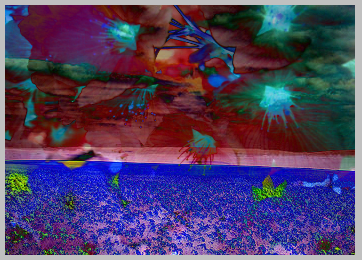
Exclusion mode (25)
This mode is between difference and negation mode. Again black and white return the same result, but colors between become grey.
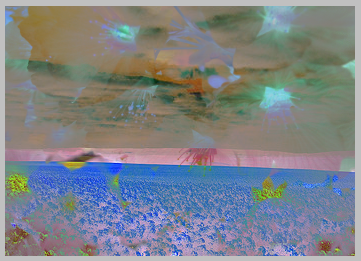
This mode is commutative (base and blend layer can be swapped).< /p>
Negation mode (30)
This one is the "opposite" of difference mode. Note that it is not difference mode inverted, because black and white return the same result, but colors between become brighter instead of darker. This mode can be used to invert parts of the base image, but not to compare two images.
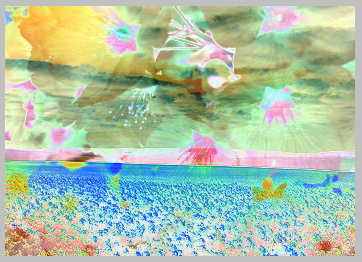
Xor mode (33)
Base and blend color are combined with a logical (binary) XOR. The result looks very strange if used on normal images (like photos). Like difference, exclusion and negation this mode can be used to invert parts of the base image, and to compare two images (results in black if they are equal). This mode can be applied twice to get the original image back. Any pixels that are the same in both image will become black (because Y xor Y is zero).

This mode is commutative (base and blend layer can be swapped).
And mode (34)
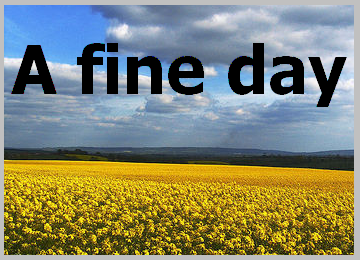
Base and blend color are combined with a logical (binary) AND. The result looks very strange if used on normal images (like photos). The image will tend to get darker, because for a bit in the result to be turned on, the corresponding bit in both the base image and blend image must be on.

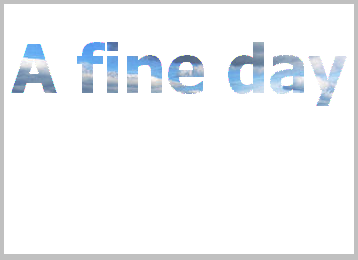
If you use black text on a white background as the blend image effectively this becomes a transparent merge, because the black becomes black, and the white is unaffected, as below:
This mode is commutative (base and blend layer can be swapped).
Or mode (35)
Base and blend color are combined with a logical (binary) OR. The result looks very strange if used on normal images (like photos). The image will tend to get lighter, because for a bit in the result to be turned on, only the corresponding bit in either the base image or the blend image needs to be on.

If you use black text on a white background as the blend image effectively this becomes a mask merge, because the black lets the underlying image through, and the white stays white, as below:
Examples on this page
The examples on this page are taken from Fields of gold... by Spiralz, and Thanks to solea by jam343. These are licensed for royalty-free use under the Attribution 2.5 Generic License. They were obtained from the web site http://www.everystockphoto.com/.
Some ideas and descriptions were adapated from the Pegtop.net Blend Modes article.
Summary of the pages with the various mode groups:
- Normal, average, dissolve
- Darkening modes
- Lightening modes
- Soft/hard light modes
- Difference/logical modes
- Glow modes
- Colour copying
- Colour limiting
- Channel modes
- HSL modes
Other pages about miniwindows
- Introduction
- Creating miniwindows
- Drawing shapes
- Drawing images
- Drawing text
- Hotspots
- Helpful graphics functions
![[Home]](/images/home.gif)